
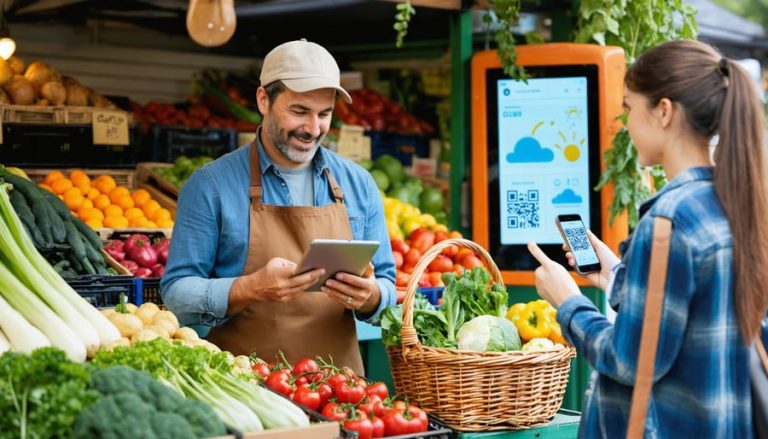
Running a farmer’s market stand used to mean showing up with great produce, a good attitude, and a cash box. But today, success depends on more than fresh fruits and friendly smiles — it requires digital organization, mobile payments, social promotion, and design that draws people in. Whether you’re selling handmade jams, pasture-raised eggs, or local honey, the right tools can help you run smoother operations, attract repeat customers, and boost profits — all without losing that personal, local charm.
1. Point-of-Sale (POS) Tools That Work Anywhere
Cash is no longer king — customers expect to tap, swipe, or scan. Portable POS systems like Square, Clover Go, and SumUp make it simple to accept all major cards and digital wallets at your market booth. Square, in particular, is a favorite among small vendors because it combines card processing, sales tracking, and inventory management into one sleek app. You can even print or email receipts instantly.
These tools also allow you to set up product categories and modifiers — for example, labeling “heirloom tomatoes” or “organic herb bundles.” That way, you don’t have to memorize pricing on a busy Saturday morning. Most systems work offline too, automatically syncing once you’re back in Wi-Fi range.
POS checklist for farmers and makers:
- Choose a reader compatible with your smartphone or tablet.
- Set up your product catalog in advance to save checkout time.
- Offer digital receipts to reduce paper waste.
- Track best-sellers weekly to inform your crop or product planning.
2. Mobile Payment Apps for Easy Customer Transactions
Even with a card reader, some shoppers prefer mobile peer-to-peer payments. Accepting options like Venmo Business, PayPal Zettle, or Cash App for Business ensures you never miss a sale from someone short on cash. Venmo Business profiles also serve as micro-marketing — your customers’ purchases appear in their social feed, acting as organic word-of-mouth promotion.
Set up a QR code sign at your booth so customers can scan and pay without holding up the line. It’s also wise to clearly display your handle (for example, “@SunnyMeadowFarms”) in two or three visible spots. Mobile payments are not just convenient; they create a digital paper trail that makes bookkeeping and taxes far less stressful later.
Smart setup tips:
- Link all mobile payment apps to a dedicated business bank account.
- Use a secure PIN or biometric lock on your payment device.
- Post clear signage with accepted payment types.
- Keep backup connectivity through a hotspot if your market has weak signal.
3. Simple Inventory & Pricing Management Tools
When you’re dealing with perishable goods, inventory accuracy can make or break your weekend. Tools like Sortly, Square for Retail, and Farmbrite help track your stock levels, pricing, and sales patterns. Sortly uses photos and barcodes for quick inventory checks, while Farmbrite is designed specifically for farmers — tracking harvest quantities, supply costs, and sales channels.
These systems save time during setup and teardown, too. You can quickly note what sold out, what’s left, and what needs restocking for the next market. Over time, patterns emerge: maybe your microgreens sell best in early spring, or peaches peak in mid-summer. That insight helps you plan production and reduce waste.
Inventory control checklist:
- Categorize products by type (produce, baked goods, crafts, etc.).
- Track quantities before and after each market day.
- Record average sell-through rates per product.
- Review monthly reports to adjust production or pricing.
4. Marketing & Social Media Scheduling Tools
Customers can’t buy from you if they don’t know where you’ll be. Digital marketing tools like Buffer, Later, and Meta Business Suite simplify posting across Instagram, Facebook, and Threads. You can schedule market-day reminders, spotlight seasonal produce, or share behind-the-scenes farm photos — all from your phone.
Consistency builds recognition. Using scheduling tools ensures you maintain a presence even when you’re knee-deep in harvest. Many allow you to track engagement metrics so you can see what type of posts (recipes, farm stories, or new products) drive the most traffic to your stand.
Marketing action plan:
- Create a posting calendar.
- Tag your local market or other vendors to expand reach.
- Highlight new or limited-availability products each week.
- Encourage customers to share photos using a branded hashtag.
5. Accounting and Expense Tools to Keep You Profitable
No matter how small your stand is, tracking money properly keeps your operation sustainable. Tools like QuickBooks Self-Employed, Wave Accounting, and FreshBooks make it easy to track income, expenses, and mileage. QuickBooks integrates with Square and PayPal, automatically categorizing transactions, while Wave offers a free version perfect for solo vendors.
These platforms simplify tax preparation and give you visibility into your true margins — essential if you plan to scale into larger markets or wholesale. Set aside a few minutes each week to log purchases like packaging, stall fees, and materials, so nothing slips through the cracks.
Bookkeeping basics:
- Separate personal and business accounts.
- Log sales daily to track true revenue.
- Keep digital copies of receipts in cloud storage.
- Review profit-and-loss reports monthly.
🧑🌾 FAQ: Card Design Tips for Farmer’s Market Vendors
Cards — whether business, loyalty, or thank-you — are a simple, low-cost way to keep customers coming back. A good design reflects your brand and fits naturally into your booth’s aesthetic. Here are some frequently asked questions from farmers’ market vendors about designing and printing cards for their stands.
- What are the best online tools for designing cards for my booth?
Several platforms are perfect for creating cards that fit your stand’s vibe. Adobe Express offers a print card template feature where you can easily add your logo, colors, and business details. VistaPrint is ideal for bulk printing professional-quality cards, while Zazzle provides flexible options for smaller quantities or custom shapes. - How can I design cards that stand out without feeling too commercial?
Stick to earthy tones and natural textures that match your market aesthetic. Include a short story about your farm, like “Family-grown in Maine since 2010,” to add personality. Use simple graphics, like leaves, produce sketches, or icons representing your products. Avoid overloading text — your card should invite curiosity, not overwhelm. - Should I include digital contact info on my cards?
Yes! In today’s market, digital touchpoints help customers find you later. Include your Instagram handle, website, or QR code linking to your social media or online shop. QR codes also save paper and make it easy for repeat customers to pre-order or check availability between markets. - What card materials work best for outdoor markets?
Matte or recycled cardstock offers a natural, rustic feel that fits most farmer’s markets. If you expect weather exposure, choose thicker paper or laminated options to prevent smudging. Many vendors use mini cards or tags for items like jars or baked goods to double as both branding and pricing tools. - How many cards should I print for a market season?
It depends on your traffic, but a safe starting point is a couple hundred cards per season. Order in small batches if you expect to adjust branding or contact details. Printing in bulk can save money, but keeping a few editable templates handy helps you stay flexible if your offerings change.
Running a farmer’s market stand blends old-fashioned community spirit with new-age efficiency. The best digital tools help you accept payments, track inventory, market your products, and design beautiful visuals — all while keeping your focus on the customers who make your work worthwhile.
When every minute of your morning counts, these tools turn the complex into the simple: checklists over chaos, digital over manual, connection over confusion. With the right setup, your stand doesn’t just sell — it tells your story, builds your brand, and plants the seeds for loyal customers season after season.


